Engineering Deck
Data Architecture & Ingestion Systems Documentation — Public Technical Log
Welcome to the Main Engineering Console. This page documents the full technical architecture of the Star Trek Lore App — from the initial Memory Alpha XML dump ingestion to AI enrichment, cross-lore Synaptic Linking, and community moderation. It is intended for the open-source community and technically inclined Star Trek enthusiasts who want to understand how the data gets built, preserved, and interconnected.
The database is not hand-curated entry by entry. It is constructed through a layered pipeline: a large community XML dump is parsed and imported, a Google Gemini AI layer enriches specific fields, SQL-based cross-reference queries build lore links, and a data healing mechanism ensures that re-importing a new dump never overwrites manually approved community contributions.
Architecture Philosophy: To achieve maximum performance, zero subspace latency, and eliminate live API dependencies, all heavy processing workloads—including raw wikitext parsing and Gemini AI dossier restructuring—are executed offline in a local development environment. The public production database serves a pre-compiled, fully synchronized static archive. This ensures all live requests are served instantly with zero external overhead. Consequently, active telemetry re-parsing and AI synchronization controls are locked on the production node and managed exclusively from local workstations.
Phase 0 — Memory Alpha XML Ingestion & ETL
0.1 — Objective & In-Universe Role
- Purpose: Build a zero-dependency, memory-efficient pipeline to ingest the ~476 MB Memory Alpha XML dump and isolate it in a local staging database:
memory_alpha_pipeline. - Isolation: Ingestion of raw XML dumps is computationally heavy. Keeping the import in a dedicated, isolated database shields the live
startrek_dbfrom bulk transactional locking and schema instability. - Relational Mapping: Automatically classifies wiki articles into structured buckets (Episodes, Performers, Locations, Technology, Starships, Species, Culture/Lore) based on the
Infoboxtemplate definitions detected inside each article. - Live Sync: After sanitizing and converting wikitext to Markdown, downstream integration scripts can selectively merge only changed records into the live website database using content hash comparison.
0.2 — Baseline Metadata & Ratings (TMDb Integration)
Before parsing wiki articles, the pipeline establishes a structured baseline of canonical Star Trek television series and movies. This metadata is ingested from The Movie Database (TMDb) API. TMDb serves as our source of truth for:
- Structural Registry: Automatically populates the
seriesandepisodestables with accurate season directories, episode numbers, runtime lengths, and original broadcast air dates. - Production Cast & Crew: Imports the structured billing credits mapping actors to their respective character names, as well as production credits for writers and directors per episode.
- Media Assets: Fetches high-resolution episode still images and promotional series posters, storing TMDb relative paths to offload delivery to their image CDN.
- Watch Providers: Connects to TMDb's watch providers API to dynamically display active regional streaming services (e.g., Netflix, Paramount+, Apple TV) on which users can watch episodes.
Each episode's popularity and user sentiment is quantified using a hybrid rating system. The system starts with a pre-populated baseline from TMDb ratings, but allows local user activity to overrule it once a statistically meaningful sample is established.
1. TMDb Baseline (Fallback): If an episode has fewer than 5 local user reviews, the UI displays the TMDb score scaled to a 5-star rating: (tmdb_vote_average / 2). This protects new or niche episodes from displaying highly volatile averages based on only one or two local votes.
2. Local Overrule Threshold (≥ 5 ratings): Once an episode accumulates 5 or more local user ratings in the user_activity table, the system automatically overrules the TMDb baseline. The interface dynamically switches to showcase the local community average (avg_score) and displays the count of local user logs.
3. Anti-Spam & Credibility: By utilizing this hybrid model, we ensure that the page always displays a credible score (falling back to TMDb's global vote pool of thousands of users) while still giving the local community full authority to define their own ratings once sufficient local consensus is reached.
0.3 — In-Universe Chronology & Stardate Sorting Engine
Star Trek's timeline spans over a millennium, from the mid-22nd century (Enterprise) to the 32nd century (Discovery S3–S5). Because series often air concurrently but represent overlapping or staggered in-universe times, sorting purely by broadcast release date breaks the chronological narrative flow.
To solve this, we compile an absolute timeline utilizing a calculated sort key: chronological_sort (stored as a BIGINT). This index is generated dynamically for each episode via the following mathematical formula:
chronological_sort = (in_universe_year * 10000) + (season * 100) + episode_number
The primary variable—the in-universe calendar year (e.g. 2364)—is determined via our Google Gemini AI ingestion pass, which analyzes wikitext and episode context. However, to handle edge cases, API limits, or lack of date metadata, we implement a strict fallback hierarchy:
(TOS: 2265 | TNG: 2364 | Other: 2370)"] Parse --> Valid{"Is Valid Integer?"} Valid -->|Yes| UseYear["Use Resolved Year"] Valid -->|No| GlobalDefault["Fallback: 2364"] UseYear --> FinalSort["Calculate chronological_sort
(year * 10000 + season * 100 + ep)"] GlobalDefault --> FinalSort SeriesFallback --> FinalSort
1. Interweaves Parallel Series: TNG Season 7 and DS9 Season 2 both occur in the in-universe year 2370. This formula successfully interweaves their episodes chronologically rather than separating them into broad blocks.
2. Avoids Stardate Instability: Star Trek Stardates are famously inconsistent (with TOS using random numbers, and prequel/sequel eras using entirely different scales). The in-universe calendar year provides a stable, unified timeline anchor.
3. Ensures Sequence Preservation: Incorporating the season and episode number as lower-order digits preserves the precise broadcast/production sequence for episodes occurring within the same in-universe year.
0.4 — Core Technical Architecture & Design Decisions
Python was chosen for its platform-independent execution, highly efficient database connector library (mysql-connector-python), and powerful built-in text processing tools. It allows packaging the pipeline as clean, zero-dependency command-line scripts ready for the open-source community.
Memory Alpha's XML dump is large (~476 MB). DOM-based parsers like xml.etree.ElementTree.parse or Python's minidom load the entire XML document tree into RAM, leading to massive memory usage (>1.5 GB) and Out-Of-Memory (OOM) failures. We implemented iterparse, which processes pages incrementally as a stream and regularly clears processed nodes from memory (elem.clear()), keeping RAM usage strictly under 50 MB.
Each Memory Alpha wiki article begins with one or more {{Infobox ...}} template calls that identify the type of entity. The parser reads these templates to classify an article as an episode, actor, starship, location, species, or other lore type. This is the core routing logic that determines which downstream pipeline phase processes which record.
# Example template detection (simplified)
if '{{sidebar individual' in lower_wikitext:
    record_type = 'actor'
elif '{{episode' in lower_wikitext:
    record_type = 'episode'
elif '{{sidebar starship' in lower_wikitext:
    record_type = 'starship'
MediaWiki markup uses deeply nested brackets and braces (e.g. {{stardate|{{#expr: 46379.1}}}}). Regular expressions are not built to parse recursive nesting and cut off early at the first matching closing tag. We developed a character-by-character scanner that tracks bracket balance depth, ensuring nested infobox properties and internal links are extracted with 100% accuracy.
To make downstream AI processing token-efficient, each page's cleaned text and parsed infobox properties are combined and hashed with MD5. When syncing to the live database, this hash is compared: if unchanged, the record is skipped entirely; if the hash differs or the record is new, it is updated and flagged for re-enrichment. This saves over 95% of AI compute and token costs on subsequent imports.
# Hash Generation in Python
hash_payload = f"{clean_markdown}|{json.dumps(properties, sort_keys=True)}"
content_hash = hashlib.md5(hash_payload.encode('utf-8')).hexdigest()
Wiki XML dumps store image references only as filenames (e.g., Picard.jpg). The actual CDN URLs must be retrieved from the live Fandom MediaWiki API. The image crawler batches these queries (50 filenames per single API request), reducing network calls by 50×. A respectful 1.0s delay between batches and custom User-Agent headers ensure compliance with Fandom's server guidelines.
0.5 — Engineering Challenges & Solutions
Notable technical obstacles encountered during pipeline development and how they were resolved:
* Problem: Using database update timestamps (processed_at) to detect changed records fails when the ETL database is rebuilt from scratch, as every record gets a fresh timestamp. This marks all 65,000+ pages as modified, forcing the AI orchestrator to re-evaluate every page.
* Solution: Content Hashing (MD5). A hash of the clean text and infobox properties is calculated and compared. Only records with a changed or missing hash are forwarded to the AI enrichment phase.
# Hash Generation in Python
hash_payload = f"{clean_markdown}|{json.dumps(properties, sort_keys=True)}"
content_hash = hashlib.md5(hash_payload.encode('utf-8')).hexdigest()* Problem: Memory Alpha wikitext occasionally has leading whitespace before headers (e.g. == Synopsis ==). Standard regex replacements looking for (?:^|\n)== fail to match these indented headers, leaving raw wikitext in the final Markdown output.
* Solution: The regex was modified to be whitespace-tolerant using [ \t]* before the opening double equals signs.
# Indentation-Tolerant Header Conversion
md = re.sub(r'(?:^|\n)[ \t]*==\s*(.*?)\s*==\s*(?=\n|$)', r'\n## \1\n', md)* Problem: Sending batches of records containing large mediumtext blocks exceeded MySQL's default 1 MB max_allowed_packet, causing the server to drop the connection with OperationalError: 1153.
* Solution: Increased max_allowed_packet to 64 MB, reduced batch size to 250 records, and implemented an automatic transaction rollback + individual record retry loop so that zero data is lost on any partial batch failure.
# Database Reconnection and Individual Retry Fallback
except Error as e:
    conn.rollback()
    conn.close()
    conn = get_db_connection()  # Reconnect
    cursor = conn.cursor()
    for page in page_batch:
        cursor.execute(page_sql, page)
        conn.commit()
0.6 — Entity Qualification & Ingestion Selection (Referential Significance Filter)
Memory Alpha contains tens of thousands of articles. Ingesting every single minor planet, astronomical anomaly, or one-off scientific device mentioned in the background of a single episode would create massive database clutter and generate thousands of redundant AI API requests.
To solve this, the global ingestion pipeline implements a Referential Significance Filter using a custom import threshold:
- The Episode Link Census: Before any lore entity is sent to the Gemini AI layer for summary generation, the system parses all page links (
page_links) pointing to it in the staging database. - The Threshold (
--min-links, default = 3): An entity qualifies for ingestion into the primary database tables only if it is explicitly referenced by at least 3 unique episodes (articles containing thesidebar episodeinfobox). - Benefits:
1. Clutter Suppression: Keeps the directories (Locations, Species, Starships, etc.) clean and focused on canon-relevant entries.
2. API Resource Optimization: Prevents unnecessary token usage on entities with little narrative impact.
Once qualified, the pipeline classifies the raw article into structured database registries based on its detected infobox template:
- Locations:
sidebar planet,sidebar star system,sidebar station,sidebar astronomical object - Starships & Classes:
sidebar starship,sidebar starship class - Species & Factions:
sidebar species,sidebar species xindi - Culture & Lore:
sidebar organization,sidebar government,sidebar military conflict - Technology:
sidebar weapon,sidebar weapon type, or page category containingTechnology
0.7 — Comprehensive Parameter Ingestion (CPI) & Future-Proof Attribute Vaulting
To prevent data loss during extraction and ensure future flexibility, the pipeline implements Comprehensive Parameter Ingestion (CPI). This architecture divides the handling of entity specifications (such as weapons, technology, starships, species, and locations) into two distinct layers:
- The Structured Attribute Vault (
attributes_json): Instead of only extracting properties that map to currently defined database columns, the AI is instructed to perform Omni-Attribute Extraction. It parses the raw wikitext and infoboxes, resolves all nested templates and links into clean structured plain text, and stores the *entire* raw property dictionary as a JSON object in theattributes_jsoncolumn of the translation table. - Core Mapping for Search & Filtering: A small subset of these properties (such as "Weapon Type" or "Quadrant") is mapped directly to structured database columns on the main tables to drive frontend search filters. For example, highly specific raw weapon properties (e.g., "Type-X Phaser Array", "Spiral Wave Disruptor") are classified by the AI under a general, normalized category (e.g., "Phasers" or "Disruptors") for fast indexing.
- Frontend Fallback Render & Future-Proofing:
1. On Detail Pages: The frontend loops dynamically through the decodedattributes_jsonvault, rendering every single original parameter in a detailed specification table. This ensures the original, highly specific data remains fully visible to the user.
2. Future Filter Expansion: If new filters are introduced in the future, they can be extracted directly from the vault using SQLJSON_EXTRACTqueries, eliminating the need to re-run expensive AI pipelines across the entire dataset.
0.8 — Setup & CLI Operations
Sequential commands to install dependencies, initialize the schema, and execute the pipeline scripts locally:
pip install mysql-connector-pythonmysql -u root < schema.sqlpython3 scripts/populate_episodes.pypython3 wiki_parser.pypython3 image_crawler.pyDatabase Architecture & Schema
Live Database Telemetry & Diagnostics
Data Source Analysis: Raw XML vs. Relational SQL
When designing the ingestion pipeline, we evaluated the trade-offs of direct XML querying versus compiling the dump into a relational database:
- PRO: Absolute Data Fidelity — Contains 100% of the raw MediaWiki markup, nested templates, and historical revisions.
- PRO: Static & Immutable — The source file is read-only. It cannot be corrupted by SQL injection or thread failures.
- CON: Sequential Disk Bottlenecks — Searching requires streaming the entire 476 MB file sequentially. Single lookups take seconds or minutes.
- CON: No Relational Joins — Links between entities are implicit text markers. Graph traversal is impossible.
- CON: High RAM Footprint — DOM-based parsing loads the whole tree into RAM, causing standard systems to crash with OOM errors.
- PRO: Lightning-Fast Queries — MySQL indexes resolve queries across millions of rows in milliseconds.
- PRO: Structured Knowledge Graph — Explicit link storage enables complex relational queries, filters, and recommendation logic.
- PRO: Token-Friendly Syncs — MD5 content hashing avoids scanning unchanged pages, reducing LLM token consumption by over 95%.
- CON: Parser Fidelity Loss Risk — Wikitext-to-Markdown translation can discard data if edge-case templates are parsed incorrectly.
- CON: Schema Maintenance Overhead — Requires managing foreign key constraints and referential integrity.
Staging Database Schema (memory_alpha_pipeline)
The diagram below models the MySQL schema utilized in the isolated memory_alpha_pipeline staging database. This database is separate from the live startrek_db and acts as a quarantine zone for raw XML data before it is validated and synchronized.
Full Pipeline Flow: From XML to Live Database
The pipeline runs in sequential phases. Each phase gates the next — no phase should be skipped or run out of order.
Phase A — AI Enrichment: Which Fields Are AI-Generated?
Not every field in the database is AI-generated. The pipeline uses a clear separation between source-imported fields (directly from TMDb or Memory Alpha) and AI-synthesized fields (generated via Google Gemini API). This distinction is important: source fields are considered ground truth and are protected on re-import; AI fields are regenerated only when the source content hash changes.
| Entity Type | Source-Imported (Not AI) | AI-Generated Fields |
|---|---|---|
| Episodes | Title, air date, season, episode number, runtime, TMDb rating, stardate, raw wikitext | Trivia facts (3 per episode), fallback plot summary (when TMDb is incomplete) |
| Actors / Performers | Name, TMDb image path, Memory Alpha slug, known roles list | Personal biography, franchise career narrative, character dossiers (rank, affiliation, bio_summary per character) |
| Production Crew | Name, roles (director, writer, etc.), Memory Alpha slug | Career biography (5–10 structured bullet points) |
| Lore Entities (Starships, Species, Locations, Technology, Culture/Lore) |
Name, slug, infobox attributes (raw), Memory Alpha image URL | 3–5 sentence cohesive description, structured attributes JSON (e.g., homeworld, quadrant, armaments, status) |
| Lore Links | Fully via SQL + PHP regex — NOT AI | n/a — see Phase B |
| Memory Alpha Slug Matching | Hardcoded SLUG_OVERRIDES dictionary in Python script for edge cases | Initial slug proposal via Gemini API (for new episodes without manual overrides) |
Skin_Of_Evil_(episode)). Episodes with generic titles require the _(episode) suffix. A SLUG_OVERRIDES dictionary in the import script preserves manually verified slugs across re-imports, preventing a new AI pass from introducing incorrect URL mappings.
How the AI API Call Works (PHP)
The live website calls the Google Gemini API directly from PHP for user-triggered AI operations (e.g., synthesizing a community edit). The API key is loaded from the .env file at runtime:
// config/database.php — callGeminiAPI()
$envPath = dirname(__DIR__) . '/.env';
// ... reads GEMINI_API_KEY from .env ...
$url = "https://generativelanguage.googleapis.com/v1beta/models/gemini-1.5-flash:generateContent?key=" . urlencode($apiKey);
$payload = ['contents' => [['parts' => [['text' => $prompt]]]]];
// ... curl call, returns trimmed text response ...
The Python enrichment scripts use the same Gemini API but via the google-generativeai Python package and the gemini-2.5-flash model, loading the key via a custom load_env() helper inside each script.
Phase B — Cross-Lore Linking & Synaptic Connections
One of the most distinctive features of this database is bidirectional lore linking — the ability to navigate from any episode to the lore entities mentioned in it, and from any lore entity page back to every episode or biography that references it. These links are not manually curated; they are computed dynamically at two levels:
During the XML import phase, the parser extracts all explicit [[internal wiki links]] from each article's infobox and body text and stores them in a page_links table in the staging database. When the record is synced to the live database, these explicit links are resolved against the known entity registry and stored as official Synaptic Lore Links — displayed on episode pages as the primary reference registry (e.g., "Species appearing in this episode: Borg, Klingon").
Entities that are not explicitly linked in infoboxes but are mentioned by name within episode summaries, character biographies, or lore descriptions are discovered via a realtime SQL + PHP approach — without AI:
- SQL LIKE Pre-filter: A parameterized
WHERE text_field LIKE '%entity_name%'query rapidly pre-selects candidate records from the database using the MySQL index. - PHP Regex Word-Boundary Filter: Each candidate is then filtered by a PHP
preg_matchwith the\bword-boundary anchor (/\bBorg\b/ui) to reject false positives where the name appears as part of a longer word. - Deduplication: Any episodes already covered by Level 1 (official infobox links) are excluded from the Level 2 results to prevent duplicates.
- Rendered in Frontend: Results appear on each lore detail page under "Synaptic Connection Diagnostics (In-Text References)", with sortable Series / Coordinates / Mission Title columns.
// config/database.php — get_dynamic_mentions()
$nameLike = '%' . $name . '%';
$regex = '/\b' . preg_quote($name, '/') . '\b/ui';

// Step 1: SQL LIKE pre-filter
$epStmt = $db->prepare("SELECT ... WHERE et.summary LIKE :name_like");
// Step 2: PHP word-boundary exact match
foreach ($allEps as $ep) {
    if (preg_match($regex, $ep['summary'] ?? '')) {
        $matchedEps[] = $ep;
    }
}On the frontend, a JavaScript layer scans rendered episode summaries and biography texts. Wherever a known lore entity name appears (e.g. "the Enterprise" in a summary paragraph), the JavaScript wraps it in a clickable hyperlink pointing to the corresponding lore detail page. This transforms plain text into an interconnected knowledge graph without any server-side pre-processing. The injection respects word boundaries and avoids double-wrapping already-linked text.
For maximum data transparency and validation, all connections between episodes and lore entities (like planets, species, and starships) are fully bidirectional and self-documenting:
- Bidirectional Backlinks: Every planet, species, starship, and lore entity page dynamically displays a complete directory of Recorded Visitations / Mission Logs linking back to every episode referencing it.
- Verification Snippets (The "Why"): To prevent black-box AI linking, when a connection is dynamically derived (e.g., from wikitext or local summaries), the pipeline stores the exact
context_heading(e.g., "References", "Production", or "Act One") and thecontext_snippet(the sentence or paragraph where the entity name occurred). - Astrometric Mapping Validation: This allows the frontend to show exactly why a planet like Aldebaran is linked to an episode (e.g., highlighting the mention of "Aldebaran shellmouth" in the episode's references section), providing a direct verification link to Memory Alpha for external validation.
- ETL Section Segmentation: During the wikitext parsing stage (in
scripts/enrich_episode_entities.py), the pipeline splits the raw wikitext of an episode or character page into sections using heading markup delimiters (e.g.,== References ==). - Sentence Tokenization & Mapping: Within each section, a sentence splitter tokenizes the text. The engine runs a search for known entity names. When a match is found, it inserts a record into the relation tables (e.g.,
episode_locations) storing the foreign keys, the section name ascontext_heading, the matching sentence ascontext_snippet, and flagssource_type = 'ai_generated'. - On-the-Fly Dynamic Mentions: For newly added user content or descriptions that haven't been re-processed by the ETL pipeline, a realtime PHP fallback function (
get_dynamic_mentions()) scans the location/lore description texts using regex word-boundary filters and dynamically appends them to the appearances list, ensuring absolute coverage. - Verification Tooltips: On the frontend detail views, hovering over or expanding an appearance triggers a popup showing the exact
context_headingand thecontext_snippettext, giving researchers instant insight into why the system established the link.
Bidirectional Lore Link Architecture
Phase C — Data Healing & Re-Import Safety
A critical architectural requirement is: a fresh import of a new Memory Alpha XML dump must never destroy existing community-approved contributions or manually corrected data. This is solved by the Data Healing Protocol.
When the XML dump is parsed, each page produces an MD5 hash of its cleaned wikitext and infobox properties combined. This hash is stored alongside the record in the staging database.
On subsequent pipeline runs, the sync script compares the new dump's hash against the hash stored in the live startrek_db. If they are identical, the record is skipped entirely — no update, no AI re-call, no overwrite.
Only records with a changed hash (i.e., Memory Alpha itself updated the article) are re-processed. Their ai_processed_at timestamp is reset to NULL, queuing them for AI re-enrichment on the next enrichment run.
When a registered community member proposes a change to an episode summary, trivia fact, or lore description, that proposal is stored separately in the user_edit_history table with a status = 'pending' flag. It is never written directly to the primary content tables. An admin (or automated AI moderator) reviews and approves or rejects the proposal.
Crucially: a Memory Alpha re-import has zero effect on the pending or approved status of any user proposal. The import pipeline only touches the base content fields; it does not interact with user_edit_history at all. An approved community correction can only be overwritten if the underlying Memory Alpha source article itself changes (triggering a hash mismatch and a moderated re-review cycle).
Subspace Lore Synaptic Linker Exclusions
The Dynamic Synaptic Mention system (Phase B, Level 2 & 3) searches for every known lore entity name inside episode summaries and biographies. This works exceptionally well for distinctive Star Trek terms like "Borg" or "Holodeck" — but creates false positives for lore entities whose names are also common English words.
Consider a lore entity named "Tool" (a technology), "Door" (a location component), or "Series" (a cultural concept). These words appear constantly in normal English prose. The SQL LIKE pre-filter and even the PHP word-boundary regex would match them everywhere — producing dozens of irrelevant cross-references that pollute the lore link sections and confuse users.
Instead of relying on standard English word frequency corpora (such as the Google Web Trillion Word Corpus or COCA), the system utilizes a custom, domain-specific heuristic scoring algorithm. Standard frequency corpora are poorly suited for this application: they lack Star Trek context, meaning they would penalize distinctive proper nouns that are common in standard English (e.g., "Enterprise", "Mirror", "Borg") while failing to identify Star Trek-specific collision hazards.
Each lore entity is assigned a calculated Collision Suspicion Score based on four weighted factors:
- Single-Word Penalty (+50 pts): Names without spaces or hyphens (e.g., "Tool" vs "Warp Drive") carry a high risk of random collisions. Multi-word phrases are naturally protected by their word boundaries.
- Word Length Penalty (+30 / +15 pts): Shorter names are extremely prone to random collisions. Words with 4 or fewer characters receive +30 pts, while words with 5 to 7 characters receive +15 pts.
- Curated Common English Dictionary (+40 pts): Instead of a massive external corpus, names are matched against a hardcoded array of ~350 common nouns, verbs, and grammatical particles. This provides high-precision detection of common language terms without risking the false-positive exclusion of Star Trek lore names.
- Case-Sensitivity Flag (+20 pts): If the first character of the entity name is lowercase in the source dataset, it receives +20 pts, indicating that it is likely a common noun rather than a capitalized proper name.
Finally, a Manual Administrative Override allows administrators to bypass the heuristic entirely—forcing inclusion or exclusion on a case-by-case basis.
More entities are excluded. Fewer lore links appear. Precision is high but recall is low — you miss some valid connections. Best for content-dense pages where noise is a bigger problem than coverage.
Only the most obviously problematic entities are excluded. More lore links appear, including some false positives. Best for maximizing cross-reference discovery at the cost of some noise.
The admin panel provides a "Bulk Exclude Highly Suspicious (Score ≥ 90)" action for quickly suppressing the worst offenders, while still leaving lower-scoring terms active for manual review. Entities can be restored at any time without affecting the underlying data.
The Synaptic Linker operates symmetrically in two directions to create an interconnected lore web:
- Forward Linking (Detail to Lore): When rendering an episode summary, trivia fact, or actor biography, the parser dynamically scans the text for registered lore names and converts them into clickable hyperlinks referencing the lore's main detail dossier.
- Reverse Linking (Lore to Detail Registry): When viewing a lore dossier (e.g., a specific Starship, Technology, or Location), the system runs a reciprocal database query to compile and display all episodes, characters, and crew members associated with that entity.
By applying exclusion rules, administrators ensure that high-frequency common words do not pollute these relationships. If an entity or term is excluded, it is suppressed in both directions—preventing both the forward highlight link and the reverse registry association.
To maintain a pristine lore network, administrators have access to three layers of exclusion controls on the administrative command deck:
- Lore Registry Ignored List: Specific entities in the database (such as generic or collision-prone entries like "Bridge", "Doctor", or "Captain") can be flagged as ignored in the Lore Registry. This keeps the record archived but disables all automatic forward highlights and reciprocal reverse listings.
- Global Exclusions: A collection of global keywords, phrases, or collision-prone words that are systematically barred from being linked or parsed across any summaries or datasets.
- Wiki Reference Section Exclusions: Controls which subsections of Memory Alpha wikitext (such as Stellar Cartography, Library Computer, or Meta Reference lists) are displayed. Disabling a section immediately hides those reference records on both the episode sidebars and the reverse lore registries.
LCARS AI Core — Prompt Architecture
All AI enrichment is driven by static, structured prompt templates. These prompts are hardcoded directly into the Python enrichment scripts as system-level instructions passed to the Google Gemini API. They are designed to produce consistent, machine-parseable outputs (plain text or structured JSON) that can be directly inserted into the database without post-processing.
The prompt templates are also surfaced in the admin panel's LCARS AI Core tab for transparency and auditing. They are strictly read-only for general users. This matters because prompt consistency is essential for data coherence: if a prompt changes between two import runs, the AI-generated fields may adopt a different structure or tone, creating inconsistencies in the database that require re-enrichment of all previously processed records.
When a new Memory Alpha XML dump is imported in the future and certain articles have changed (hash mismatch detected), only those changed records are re-enriched. The prompt used must produce output in exactly the same structural format as the original enrichment run — otherwise, re-enriched records will have a different schema from the original records, breaking display consistency across the database.
For this reason, any modification to a prompt is treated as a schema-level change: it may require a full re-enrichment pass of all affected records, not just the changed ones.
Example Prompt: Actor Biography Restructuring
Used by: scripts/enrich_actor_biography.pyThis prompt is one of the most complex in the pipeline. It instructs the AI to produce a structured JSON object with three distinct sections for each performer: a personal biography, a franchise career narrative, and an array of character dossiers. The strict exclusion rules (no birth/death dates, no family names) ensure GDPR-friendly output and prevent the database from storing sensitive personal metadata.
You are an expert Star Trek archivist compiling the official Starfleet personnel database.
We are restructuring the biography dossier for the actor: "[Actor Name]".

Raw wikitext biography:
"[Raw Wikitext]"

Task: Restructure this biography and character info into three parts returned as a JSON object:
1. "personal_biography": Focuses on their real, personal life (early life, education, career outside of Star Trek, military service, and passing/final years if deceased).
2. "franchise_career": Focuses on their Star Trek career, characters played, franchise impact, behind-the-scenes production trivia, and relationships with other Trek cast members.
   - EXCLUSION: Do NOT list all their standard TV episodes, movies, or onscreen appearances in a raw list.
   - INCLUSION: Include interesting non-standard franchise work (voice acting, audiobooks, video games, comics they wrote, unique production roles).
3. "character_dossiers": An array of notable Star Trek characters they portrayed, sorted with the primary or most frequent character first. For each character, include:
   - "character_name": Exact name of the character.
   - "nickname": Short nickname, alias, or "None".
   - "species": Species of the character (e.g. "Human", "Vulcan").
   - "rank": Highest or current rank (e.g. "Captain", "Commander", "None").
   - "rank_evolution": Concise summary tracking rank evolution throughout the franchise.
   - "affiliation": Organization they belong to (e.g. "Starfleet").
   - "assignment": Key ships or posts (e.g. "USS Enterprise helmsman, USS Excelsior Commanding Officer").
   - "status": Last known status (e.g. "Active", "Retired", "Deceased", "Unknown").
   - "key_relationships": Key family or personal relationships.
   - "bio_summary": Concise 2-3 sentence summary of the character's career.

STRICT EXCLUSION RULES (CRITICAL):
1. NO BIRTH/DEATH METADATA: Under no circumstances mention the actor's birth date, birth year,
   birth city, birth country, death date, death year, or age at death.
   - Good: "Raised in Boston's West End, he studied drama..."
   - Bad: "Born in Boston, Massachusetts on March 26, 1931..."
2. NO FAMILY RELATIONSHIPS OR NAMES: Do not mention spouses, marriages, divorces, children,
   sons, daughters, or their names.
   - Good: "The 2016 documentary 'For the Love of Spock' was created in his memory."
   - Bad: "His son Adam made a documentary..."
3. NO CLASSIFICATION SUMMARY LISTS: Do not write summary lists of their professions.

Guidelines:
- Use bullet points (markdown '-' format) for personal_biography and franchise_career.
- Do NOT make the summaries too short or overly compressed. Keep all key details.
- The language of the response must be in English.
- Return ONLY a JSON object with these keys.
The [Actor Name] and [Raw Wikitext] placeholders are replaced at runtime by the Python script for each individual actor being processed.
Wiki Reference Section Exclusions
When the Memory Alpha XML dump is parsed, every wiki article is imported including all its subsections — not just the main narrative. Many of these subsections contain supplementary data that is technically valid but may create sidebar clutter or noise in the lore link sections if displayed unconditionally.
The following wiki section categories are recognized and can be independently toggled on or off by the admin, both for episode detail sidebars and for the reverse-direction lore link registries on entity pages:
| Section Category | Contents |
|---|---|
| References | Primary canon reference listings, citations, and verified background files from Memory Alpha. |
| Unreferenced Material | Speculative trivia, unconfirmed production details, or unsourced background lists. |
| Stellar Cartography References | Technical coordinates, sectors, space systems, or planetary grid tables. |
| Enterprise Dedication Plaque References | Details, quotes, and names transcribed directly from ship dedication plaques. |
| Library Computer References | Wiki references extracted from starship, crew, or planet library computer databases. |
| Meta References | Editorial notes, wiki maintenance records, and categorization indexing headers. |
| Galactic Map References | References from astrometric maps, galactic charts, or celestial systems tables. |
| Quadrant Overview References | References and star charts specifically labeled "Quadrant Overview" (e.g. Alpha/Beta Quadrant Overview). |
| Other References | Secondary external links, tie-in merchandise, or non-canon literary works. |
| Star Chart References | Celestial stellar navigation maps, sector borders, and astronomical grid indexes. |
| Computer Screen References | Details transcribed from background LCARS monitors, console screens, or graphics. |
| Background Information | In-depth production design history, model construction details, and visual effects logs. |
| Credits & Appendices | Onscreen billing rolls, cast lists, crew assignments, and technical publication indexes. |
| Apocrypha & External Links | Non-canon literature, deleted scene logs, external references, and Further Reading directories. |
Subspace Genealogy Network Mapping (Vis.js Graphing Engine)
The Starfleet Genealogy Net integrates a dynamic, interactive canvas visualization to map family trees, crew partnerships, and ancestral lineages across the entire Star Trek timeline.
Instead of loading the entire global character relationship database at once (which would result in an unreadable "hairball" graph of hundreds of connected nodes), the frontend requests an ego-centered subnet via a specialized API endpoint: /api/v1/intelligence/family-tree.
-
Dynamic BFS Traversal: When a user focuses on a character (e.g. Spock), the backend runs a Breadth-First Search (BFS) on the
character_relationshipsjunction table. Starting from the focused node, the algorithm traverses outward up to a configurable degree of separation (typically 2 or 3 levels). -
Data Restructuring: Once the sub-network is collected, the API fetches matching entity names, slug coordinates, and image assets, formatting them into an array of
nodes(characters) andedges(relationships).
The frontend parses the JSON payload and uses the Vis.js Network library (vis-network.min.js) to render a high-performance HTML5 Canvas interface with two layout modes:
- Force-Directed Layout (Physics Simulation): Nodes act as charged particles that repel each other, while edges act as springs that pull connected nodes together. This produces an interactive network map where users can drag nodes, zoom in/out, and watch the physics stabilize in real-time.
- Hierarchical Tree Layout: For direct family mappings, the system dynamically swaps child-to-parent edge directions to point parent-to-child, enabling Vis.js's hierarchical sorting engine to compile clean, top-down tree views showing ancestors above and descendants below.
Contextual Exclusion Filters: The interface provides real-time toggles to filter out simulation-only/dream connections, alternate timeline events (such as the Kelvin universe), or distant relatives (uncles, cousins, aunts) to keep the visualization crisp and mathematically clean.
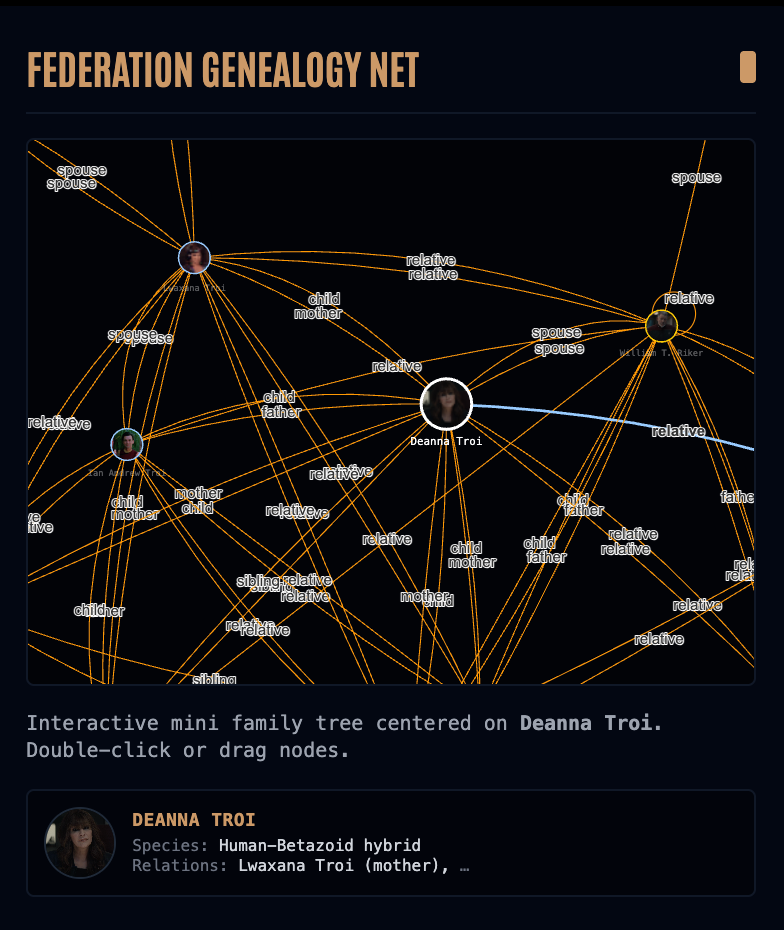 Figure D.1: Interactive Genealogy Network Mapping (Ego-Centered on Deanna Troi)
Phase D — Performance Optimization & Subspace Caching
To achieve sub-second page rendering times under standard server loads, the database layer operates a multi-tiered file caching system and strict query-optimization protocols designed to eliminate CPU-intensive text-parsing and redundant relational lookups.
Dynamic Synaptic Linking requires scanning biography and episode summaries to match thousands of lore entity names. Performing these regex transformations in real-time on every page request is computationally expensive and introduces severe page response lag.
Workings of the Cache Folder: The application utilizes a secure /cache subdirectory in the project root to store pre-compiled HTML fragments of enriched biographies, summaries, and transcripts.
-
When a detail page is requested, the system compiles a unique cache filename based on the entity's slug and a SHA-256 hash of its source content: e.g.
cache/bio_characters_spock_d2d83fcf.php. -
If the file exists and caching is enabled, the system bypasses the database and the regex linker entirely, serving the pre-compiled file using a fast PHP
includecall. - Cache Invalidation Policy: Invalidation is automatic. Because the file name depends on the content's hash, any change to the raw wikitext (due to a database re-import or user proposal approval) generates a new hash, causing a cache miss. The outdated cache file is ignored, and the new parsed output is compiled, cached, and written.
On complex content portals like the homepage (Lore Registry Gateway), rendering lists of entities with dynamic image lookups can easily trigger the classic N+1 query problem: executing one query to fetch the master list of \(N\) entries, plus \(N\) individual follow-up queries to retrieve image paths or metadata for each item.
Batch Optimization & Memory Lookups: To keep homepage rendering speeds high, the database layer employs a two-step query aggregation technique:
-
Slug Pre-Aggregation: Before rendering the registry elements, the code loops through the list of targeted entities and groups their slugs by database table (e.g.
characters,locations,species_factions). -
Single-Query Batch Fetch: The system compiles and runs a single batch SQL query using
WHERE slug IN (?, ?, ...)for each table, caching all results into a single memory lookup array:$registryImageLookup. - O(1) Resolution: In the loop, the image resolver looks up the image path instantly in the preloaded memory array. This collapses dozens of database queries into a single round-trip, resulting in a dramatic performance gain.
Phase E — Subspace Transcript Diagnostics & Biometric Telemetry
The Transcript Diagnostics terminal integrates raw script timelines with AI-driven biometric indicators, transforming simple episode transcripts into a real-time character diagnostic readout.
Transcripts are ingested from fan-compiled script archives (primarily originating from community-curated transcripts like Chrissie's Star Trek Transcripts). This data is utilized strictly for non-commercial, educational fan research under Fair Use guidelines.
Copyright Notice: Star Trek, its characters, locations, and storylines are registered trademarks of Paramount Pictures and CBS Studios. This project is a non-profit fan initiative and holds no affiliation with or endorsement from copyright owners.
To maintain strict database integrity, the transcript system separates raw fan datasets from Gemini AI processing:
- Ingested (Non-AI): Includes raw spoken dialogue, scene headings, speaker names, sequence IDs, stardates, air dates, and baseline synopsis tables imported from Memory Alpha.
-
AI-Enriched (Google Gemini): Handles dialogue emotion classification (tagging lines with tones like logical, anger, fear, determination, pain), location/setting extraction, and the compilation of the high-density
ai_super_summary. - Dossier Super-Summary: During the parsing pipeline, the AI cross-references raw transcripts with the Memory Alpha synopsis. It generates a detailed super-summary that enriches the core plot with granular dialogic context, specific scene locations, and production trivia.
As users scroll through the script viewport, the interface tracks the active line in the center focus area and dynamically feeds parameters to a simulated LCARS medical diagnostic scanner:
- Pulse & Respiration Rates (BPM/RPM): The scan panel translates the speaker's emotional state into physical metrics. Anger or fear triggers a rapid pulse (up to 140 bpm) with a red warning throb, whereas logical or suppressed states (typical for Spock or Vulcans) drop the rate to a calm cyan pulse (60 bpm).
- Fluid Respiration Levels (Lungs): The lung meter adjusts its volume in real-time, rising and falling based on the word-per-minute (WPM) density of the spoken line.
- Cell Rate & Blood Metrics (Stress & Resolve): Emotional stress gauges shift according to AI-classified tones, while Blood Q and Blood T meters spike during logical analyses or moments of Klingon resolve.
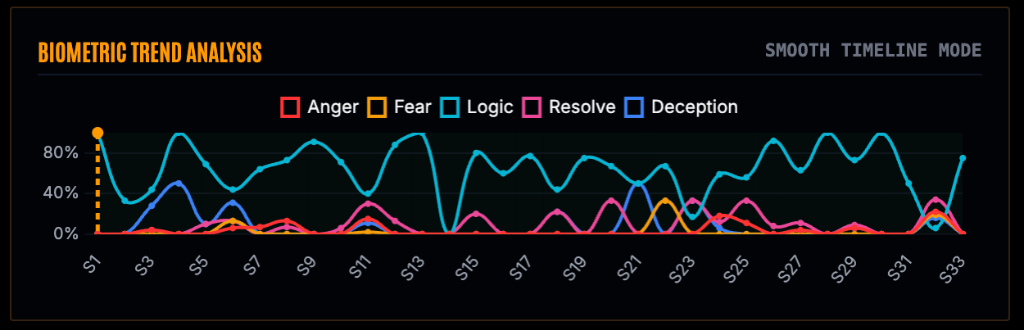 Figure E.1: Simulated Biometric Trend Analysis Subsystem (Smooth Timeline Mode)
Phase F — Custom Playlists, Subspace Channels & Auto-Cloning
The platform enables officers to construct custom watchlists, themed episode marathons, and chronological viewing channels. Public playlists are broadcast to the Federation network, allowing other users to integrate community channels directly into their personnel dossier.
To prevent broken user libraries or loss of curated viewing lists when a playlist owner privatizes or deletes their public channel, the backend executes an automatic snapshot clone (api/playlists.php):
- On Privatization or Deletion: The system queries all active subscriber IDs (
user_playlist_subscriptions). - Independent Copy Creation: For each subscriber, a standalone playlist titled
"[Playlist Name] (imported)"is created under their ownuser_idwith a fresh unique slug. - Episode Mapping Duplicate: All episode mappings from
user_playlist_episodesare copied to the new cloned playlist IDs before deleting original subscriptions.
When an officer creates, updates, privatizes, or deletes a collective playlist, the database handles state transitions through atomic transactional logic to guarantee zero orphaned records and total data preservation:
-
Title & Meta Updates (Live Relational Sync):
Executing a name or description change triggers a single targeted
UPDATEquery on the primary playlist registry. Because all subscribers reference the author's master record via a foreign key relation, updated titles and metadata reflect immediately across all subscriber dashboards without duplicating database rows. -
Public-to-Private Shift (Atomic Batch Migration):
When toggling a playlist from Public to Private (
is_public = 0), the backend initiates an automated migration pipeline. It identifies all active subscriber links and uses a bulkINSERT ... SELECTbatch query to clone the playlist structure and its episode mappings into new private records for each subscriber. Once cloned, aDELETEcommand safely purges the active subscriber link table. -
Playlist Deletion (Pre-Purge Snapshot Safeguard):
Before issuing a
DELETEon the author's primary record, the server executes a pre-purge transaction. It scans for existing subscribers, clones the playlist and its full episode mapping into standalone subscriber-owned copies, and only then executes the finalDELETEon the author's record. This prevents missing references and ensures no officer loses their saved viewing history.
Custom watchlists are integrated directly into the Starfleet Collectives hub (views/collectives.php) and playlist detail views:
-
Your Playlists Collectives Section: Positioned above Curated Watchlist Playlists on
/star-trek-playlists, displaying both personal and subscribed channels in a 3-column LCARS card grid with episode log counts and privacy badges. Includes a quick link leading to the user's profile playlists anchor (/starfleet-registry/[username]#playlists). -
Custom Playlist Picture Selection: Playlist owners can select any episode's visual sensor photo to serve as the playlist cover picture via the inline
Set as Playlist Picturebutton next to the episode rating badge. The selected picture is saved touser_playlists.cover_episode_idand dynamically rendered across collectives and profile cards. -
Synchronized Action Telemetry: Each episode card in custom playlists features side-by-side
Mark WatchedandMark Lovedstatus controls, aligned with responsive left/right layouts and pre-purge confirmation modals.
Whenever an officer integrates another user's public channel into their library, the backend automatically dispatches a user_notifications subspace signal and credits +5 Command Points (CP) to the creator's account. Accumulating integrations unlocks the Option C Broadcaster Badges: 🥉 Subspace Relay (5 integrations), 🥈 Fleet Network Curator (20 integrations), and 🥇 Starfleet Master Broadcaster (50+ integrations).
Phase G — Command Points (CP) Engine, Ranks & Page Anomaly Security
User participation and database maintenance are quantified through a centralized Command Points (CP) and officer rank progression engine.
- Watched Logged: +10 CP per episode marked as watched
- Approved Trivia Fact: +10 CP per approved submission
- Approved YouTube Trailer: +15 CP per approved link
- Resolved Anomaly / Security Report: +10 CP per accepted report
- Channel Integration: +5 CP per subscriber importing your public playlist
- Spam Penalty: -50 CP deduction for submitted proposals marked as spam
Officers can report technical glitches, broken links, typos, or database errors directly via the LCARS-styled Report Page Anomaly modal (includes/footer.php). Reports are routed to the reports table with categories (UI Glitch, Data Error, Typo, Broken Link) and reporter metadata.
When Main Engineering resolves a report, the reporter receives +10 CP and unlocks the 🛠️ Starfleet Systems Inspector Command Badge on their personnel profile.
To protect database ratings against score manipulation and review bombing, api/activity.php tracks rating_changes_count per user/episode pair. A user can alter their 1-to-5 star rating a maximum of 5 times per episode. Upon reaching 5 modifications, further rating edits for that episode are permanently locked.
Community Moderation & Data Governance
The Star Trek Lore App is a community-participatory database. Registered users can propose changes to episode summaries, trivia facts, lore descriptions, and trailer links. These contributions go through a structured governance workflow before they can influence the canonical database content.
Every community edit proposal is stored in user_edit_history with a status of pending. It is never written directly to content tables. The queue is visible to admins and moderators in the admin panel, where each proposal can be reviewed against the existing database content and approved, rejected, or flagged as spam. Approved contributions earn the proposer Command Points (CP) and can unlock Starfleet rank badges.
The admin panel includes an optional AI Auto-Approval switch. When enabled, a REST API endpoint (/api/v1/admin/auto-approve) is activated. An external AI agent can call this endpoint (authenticated via an admin-rotatable API key in the X-Admin-API-Key header) to automatically review pending proposals and classify them as approved, rejected, or spam. When a proposal is approved by AI, the same synthesis prompt used for the initial AI enrichment is applied — combining the user's proposal text with the existing database content into a single cohesive, updated version. This ensures AI-approved edits maintain the same quality standard and format as the original AI-generated content.
The platform uses a two-tier clearance structure dividing access between registered Starfleet Officer accounts (Level 1) for mission logging, personal logs, watchlists, and episode ratings, and Command Clearance (Level 3 / Admin) for platform security, global exclusions, and system configuration.
Environment Configuration & API Keys
All sensitive credentials and environment-specific configuration are stored in a .env file at the project root. This file is never committed to version control. If you are setting up this project locally, you must create this file manually and populate it with your own API keys.
# Star Trek Lore App — Environment Configuration

# Google Gemini API (Required for AI enrichment)
GEMINI_API_KEY=your_gemini_api_key_here

# TMDb API (Required for episode & series metadata)
TMDB_API_KEY=your_tmdb_api_key_here
TMDB_READ_TOKEN=your_tmdb_read_token_here

# MySQL Database
DB_HOST=your_database_host
DB_NAME=your_database_name
DB_USER=your_database_user
DB_PASS=your_database_password

# Google reCAPTCHA v3 (for user registration)
RECAPTCHA_SITE_KEY=your_site_key_here
RECAPTCHA_SECRET_KEY=your_secret_key_hereThe Gemini API key is required for all AI enrichment scripts and the live PHP AI synthesis calls. You can obtain a free key from Google AI Studio:
[ Google AI Studio — Get API Key ]The TMDb API is used by the episode population scripts to fetch metadata (titles, air dates, runtimes, ratings). Register for a free API key at:
[ TMDb — Request API Access ].env file manually line-by-line (no external dotenv library). The Python scripts include a custom load_env() helper function that performs the same task, keeping both environments dependency-free and portable.
All ETL scripts, schema files, and enrichment utilities are being prepared for public release. GitHub links on this page will become active once the repository is published.